Pipe stress analysis tools simulate loads, thermal growth, and dynamic events to verify mechanical integrity, satisfy codes, and protect safe operation. This comparison shows how the right software reduces cost and schedule risk, simplifies audits, and improves engineering outcomes. We walk procurement and engineering teams through the features that matter for accuracy, how licensing choices affect total cost of ownership, and which products best match common regulatory needs. The guide maps evaluation criteria, profiles leading 2024 tools, compares subscription and perpetual models, and explains when outside consultants speed correct adoption. Key terms such as pipe stress analysis software, CAESAR II features, AutoPIPE pricing, FEA software for pipe stress, and CADWorx integration pipe stress are included so readers can quickly find the tools that fit their workflow.
Multiple studies and reviews highlight the role of pipe stress software in improving engineering decisions and project efficiency.
Pipe stress analysis and decision-making
This study describes applying knowledge-based systems (KBS) to support engineering decisions in pipe stress analysis. The approach links KBS with existing pipe stress tools so users get guided checks and time-saving recommendations. The authors show benefits in reduced engineering hours and improved decision consistency for process-industry piping designs.
Decision-making on pipe stress analysis enabled by knowledge-based systems, M Alvarado, 2007
What are the key features to compare in pipe stress analysis software?
Start with a focused checklist of technical capabilities that drive analysis fidelity, workflow speed, and auditability. Core items include solver accuracy, supported analysis methods (beam models versus FEA), CAD/CAE integration, material and code libraries, dynamic/transient capabilities, and reporting/traceability. Each item directly affects engineering risk: better accuracy cuts rework, stronger integration reduces handoff errors, and traceable reports ease regulatory review.
- Simulation accuracy and analysis methods: How closely results represent actual behavior under thermal, pressure, and seismic loads.
- CAD/CAE interoperability: Ability to transfer models from Plant 3D or other CAD platforms while preserving geometry and metadata.
- Material libraries and code compliance: Built-in ASME B31.3 and related code checks that reduce manual calculations and support audits.
- Dynamic analysis and transient capabilities: Necessary for seismic design, water-hammer events, and fatigue assessments.
- Reporting, traceability, and documentation: Automated deliverables for regulatory inspections and version control.
These features form the baseline for technical evaluation. Which ones matter most depends on project complexity and regulatory exposure. Next we explain how analysis-method trade-offs influence solver selection and project risk.
How do simulation accuracy and analysis methods impact software performance?
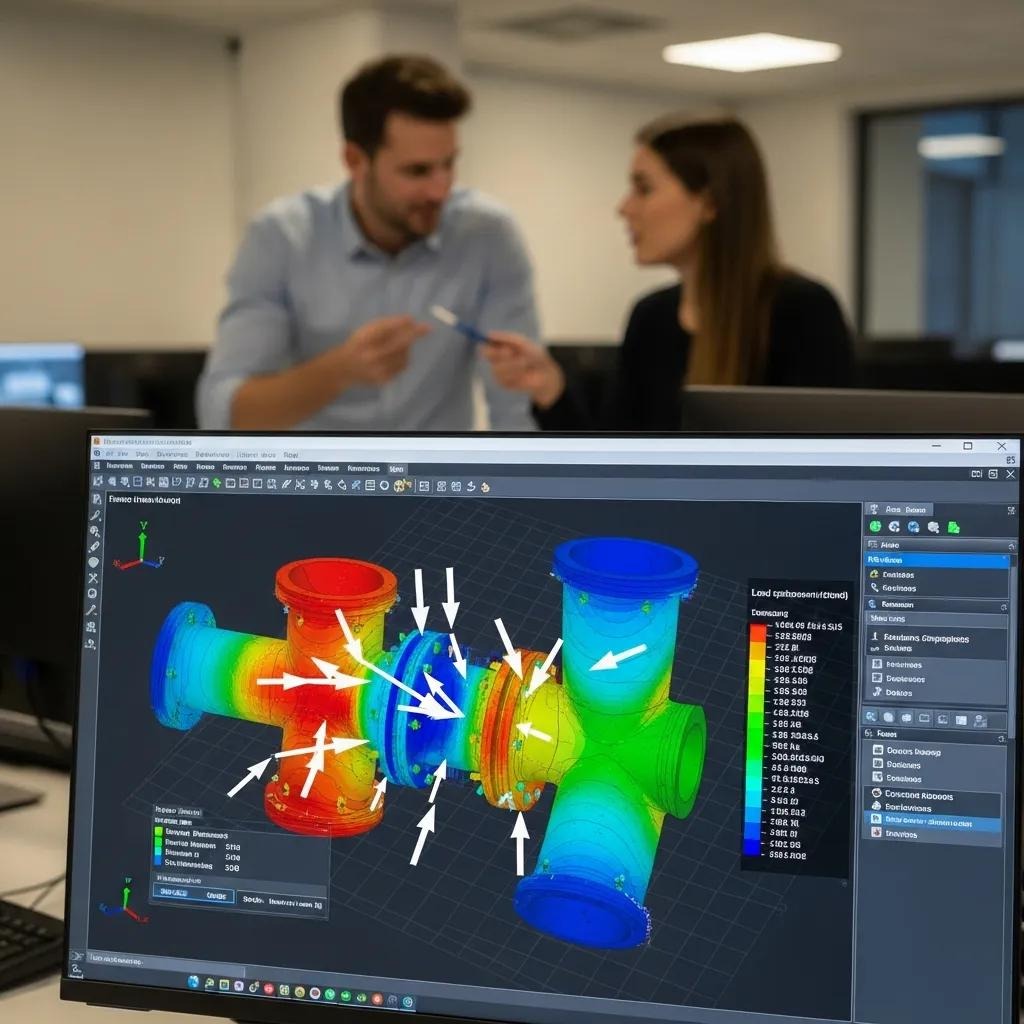
Simulation accuracy measures how well a solver captures stresses, displacements, and interactions — and it directly affects safety margins and confidence in decisions. Beam-element models are efficient for full-system routing and give quick, conservative estimates for global load paths. Finite element analysis (FEA) provides higher fidelity for local stress concentrations, complex boundaries, and nozzle loads, but it takes more setup and compute time. Typical error sources include coarse meshes, simplified boundary conditions, and inaccurate material assumptions. Mitigate these with QA checks, verification cases, and sensitivity studies. Software that supports hybrid workflows — beam for system-level checks and FEA for details — balances effort and precision and lowers the chance of regulatory issues.
What role do CAD/CAE integration and reporting capabilities play?
Good CAD/CAE integration transfers piping geometry, component metadata, and isometric information between drawing and analysis tools, cutting manual re-entry and errors. Native connectors for Plant 3D, OpenPlant, or neutral formats preserve node locations, pipe properties, and support definitions so iterations are faster and models stay consistent. Automated reports and traceable compliance outputs create audit trails required by codes like ASME B31.3, packaging assumptions, load cases, and acceptance criteria for reviewers. Strong integration reduces RFIs, rework, and approval time; weak integration increases manual checks and schedule risk. Prioritize tools that keep metadata intact and generate standardized, verifiable documentation for each run.
Which leading pipe stress analysis software should you consider in 2024?
Compare core capabilities, supported analysis types, and industry fit when shortlisting vendors. Products differ in solver fidelity, code coverage, CAD connectors, and specialist modules (buried pipe, subsea, transient). The table below gives a side-by-side technical comparison to highlight differences that matter for procurement and project outcomes.
The following comparison table summarizes technical strengths and weaknesses across representative tools:
| Software Name | Key Features | Analysis Types Supported | Code Compliance | Typical Industries | Strengths | Weaknesses |
|---|---|---|---|---|---|---|
| CAESAR II | 3D modeling, extensive code checks | Beam, static, some dynamic | ASME, EN, API family | Power, Process, Oil & Gas | Broad code coverage; mature workflows | Steeper learning curve for novices |
| AutoPIPE | Buried pipe modules, optimization tools | Beam, transient, buried pipe | ASME, local codes | Infrastructure, Oil & Gas, Utilities | Strong buried pipe and optimizer features | Limited FEA capabilities; requires add-ons for full FEA |
| CAEPIPE | Integrated modeling and plotting | Beam, some FEA coupling | ASME, API | Industrial piping, Utilities | Efficient for routine plant workflows | Less emphasis on advanced transient analysis |
| Rohr2 | Robust solver and support modules | Beam, nonlinear support analysis | EN, ASME subset | Civil, Industrial, Bridge-related piping | Good for complex support and nonlinear cases | Smaller ecosystem for CAD connectors |
Once you’ve done the technical review, match tools to team skills and project scope. Our recommendation: CAESAR II often fits power and complex process projects, while AutoPIPE is a strong choice when buried pipelines and optimization are primary concerns. Request a Demo to see which software matches a given project profile. The sections below detail the core strengths of CAESAR II and AutoPIPE.
Academic and industry reviews frequently note the widespread use of commercial tools such as CAESAR II, AutoPIPE, and Rohr for complex piping projects.
Commercial pipe stress software in practice
Comparative reviews and empirical studies often rely on commercial packages like CAESAR II, AutoPIPE, and Rohr to evaluate pipeline behavior and design approaches. These tools are commonly cited in analyses of buried pipelines and fault-crossing cases due to their established solvers and feature sets.
Onshore buried steel fuel pipelines at fault crossings: a review of critical analysis and design aspects, VE Melissianos, 2008
What are the core features and benefits of CAESAR II?
CAESAR II delivers comprehensive 3D pipe stress analysis with broad code support and established process-industry workflows — making it a default choice for many regulated projects. Its strengths include extensive material and code libraries, audit-ready reporting templates, and CAD-to-analysis integrations. CAESAR II suits teams that need traceability and recognized acceptance criteria for regulators and stakeholders. Typical limitations are a higher initial learning curve and the need to couple with higher-fidelity FEA tools when local stress concentration details are required. For larger teams prioritizing standardization and repeatable QA, CAESAR II offers a predictable path to compliance.
How does AutoPIPE compare in features and industry applications?
AutoPIPE stands out for buried-pipeline analysis, optimizer modules, and soil-structure interaction features, which makes it attractive for infrastructure and utilities. It uses beam-based modeling with modules that simplify thermal growth and support design, and it integrates with some BIM/CAD ecosystems to preserve routing metadata. AutoPIPE is a strong fit for long linear projects and sites where soil interaction and buried routing drive design choices. We often recommend AutoPIPE to clients with significant buried-pipe scope or where optimization reduces field-support costs. Request a Demo to evaluate how it fits your BIM workflows.
How do pricing models differ among pipe stress analysis software?
Licensing generally falls into subscription and perpetual models, each with distinct budget and operational implications. Subscriptions lower upfront capital, frequently include updates and cloud features, and allow flexible scaling for short-term teams. Perpetual licenses require higher initial spend but can be cheaper long term for stable teams if maintenance is managed. Total cost of ownership (TCO) covers license fees, support, training, and productivity impacts — so match TCO to project cadence and staffing to assess ROI. The table below summarizes common license attributes to help procurement compare cost structure by project type.
Evaluating the full financial picture — beyond purchase price — is essential when choosing engineering software, as TCO studies have long emphasized.
Understanding total cost of ownership for software
Organizations often focus on acquisition costs and underestimate the ongoing expenses of maintaining and operating a software system. Assessing support, upgrades, training, and operational impact is critical when planning software investments.
Total cost of ownership, 2005
| License Model | Typical Upfront Cost | Ongoing Cost (annual/subscription) | Included Support/Updates | Best For (project type) |
|---|---|---|---|---|
| Subscription | Low-to-moderate | Predictable monthly/annual fee | Often included in subscription | Short-term projects, scaling teams |
| Perpetual + Maintenance | High (one-time) | Annual maintenance (15–20% typical) | Updates during maintenance period | Long-term users with stable workloads |
| Floating/Concurrent | Moderate | License pool fees | Varies by vendor | Multi-project organizations with variable usage |
In short: choose subscription for predictable OPEX and fast access to updates; choose perpetual when long-term ownership and amortized cost are primary concerns. The sections that follow outline practical trade-offs for each model.
What are the advantages and disadvantages of subscription licensing?
Subscription reduces upfront capital and typically bundles version updates, cloud collaboration, and vendor support for the subscription term. Benefits include predictable OPEX, easier budgeting for short engagements, and continuous access to the latest features. Trade-offs are ongoing expense that can exceed perpetual costs over time and potential dependence on cloud-only features. Subscriptions suit project-based teams, temporary staff increases, and organizations that value continuous updates. When comparing options, run multi-year TCO scenarios with realistic utilization to find the break-even point versus perpetual licensing.
How does perpetual licensing affect cost and ROI?
Perpetual licensing requires a larger initial outlay but can be more economical when software is used continuously across many projects over several years. Maintenance fees cover patches and major releases; skipping maintenance limits upgrades and vendor support. Perpetual licenses work well for teams that standardize a single toolchain and prefer CAPEX budgeting. The ROI case improves with high utilization, steady workloads, and the reuse of templates and training. Procurement should model a multi-year horizon including training, support, and productivity gains to assess net present value.
Which software fits best for different regulated industry needs?
Industry rules and project characteristics determine which attributes are essential. Regulated sectors need code traceability, dynamic analysis for safety systems, and robust reporting for audits. Matching software capabilities to industry constraints reduces compliance risk, shortens approval cycles, and limits rework. The table below maps typical industry requirements to recommended software attributes and example use cases for oil & gas, power, nuclear, chemical, and infrastructure projects.
| Industry | Typical Requirements (codes, materials, analysis types) | Recommended Software Attributes | Example Use Cases |
|---|---|---|---|
| Oil & Gas | Multiphase flow, buried pipelines, ASME/API codes | Buried pipe modules, transient analysis, API/ASME libraries | Offshore riser transitions, pipeline thermal expansion |
| Power & Nuclear | Dynamic seismic, stringent code traceability | Strong dynamic solver, audit-ready reporting, hybrid FEA | Seismic snubbers, high-temperature steam piping |
| Chemical | Corrosion allowances, exotic materials (FRP/GRP) | Extensive material libraries, compatibility checks | Retrofit of FRP-lined process piping |
| Infrastructure / Utilities | Long buried runs, soil-structure interaction | Buried pipe analysis, BIM integration | City water mains and utility corridors |
Summary: choose tools that provide code-specific modules and audit-ready outputs for regulated projects; prioritize dynamic analysis for safety-critical sectors like nuclear and power. The next subsections offer concise recommendations by sector.
What are the best options for oil & gas, power, and nuclear sectors?
Oil & gas projects need buried-pipe analysis, transient solvers, and API/ASME compliance — so select software with specialized buried-pipe modules and transient capabilities to capture multiphase behavior and soil interaction. Power and nuclear projects require robust seismic and dynamic analysis plus rigorous documentation and traceability; hybrid beam/FEA workflows and strong reporting templates are advantageous. In regulated sectors, auditability and conservative validation matter as much as solver fidelity. Choosing software that aligns to these priorities reduces approval cycles and rework during inspections.
How do software choices vary for chemical and infrastructure projects?
Chemical projects frequently involve unusual materials like FRP/GRP and require careful handling of corrosion allowances, so material-library coverage and custom material definitions are critical. Infrastructure projects focus on long buried runs and BIM integration for asset management, so prioritize CAD/BIM connectors and soil-structure modules. Scalability, flexible licensing, and standard deliverables are practical considerations because projects often run in phases and feed asset-management systems. Picking a tool aligned with materials and BIM workflows reduces modeling friction and supports lifecycle maintenance.
Why does expert consultation matter when choosing pipe stress analysis software?
Specialist consultants reduce selection risk by mapping project constraints to software capabilities, validating pilot analyses, and building tailored workflows that speed adoption. Consultants provide regulatory guidance, QA-template configuration, and knowledge transfer that preserve institutional expertise. Typical consultant tasks include requirement assessment, pilot studies, and ROI modeling to find the tool that balances accuracy, cost, and schedule. Below we describe how a consulting partner turns technical evaluation into deployable processes and team training.
How can XCEED Engineering help optimize software selection?
XCEED Engineering and Consulting, P.C. combines hands-on engineering services with strategic guidance. We evaluate feature fit against project scope, pilot candidate software on representative load cases, and recommend deployment paths that can cut project cost and schedule by up to 25 percent. Our process moves from assessment to a short pilot and then to a recommendation that balances budget, timeline, and compliance. Request a Demo to see which software best fits your project and how a tailored selection can lower risk and accelerate delivery.
What are the benefits of tailored engineering solutions in software choice?
Tailored solutions align tool configuration, templates, and training to project needs, cutting rework and shortening approval cycles. Custom workflows and focused training reduce the learning curve and make results more consistent across teams, producing measurable productivity gains. By prioritizing tailored implementation, organizations often gain faster regulatory acceptance and fewer field-change orders, which improves schedule and cost outcomes. XCEED’s practical, cost-conscious approach focuses on efficient deployment and field-tested solutions to realize these benefits.
Frequently Asked Questions
What factors should I consider when choosing pipe stress analysis software?
Consider simulation accuracy, supported analysis methods, CAD/CAE integration, and reporting capabilities. Match software features to project requirements, regulatory compliance, and team skills. Also evaluate user experience, available training, and the total cost of ownership including licensing and support. These elements together determine whether a tool will meet both operational and budgetary needs.
How can I ensure the software I choose is compliant with industry regulations?
Choose software with built-in code libraries and automated compliance checks for standards such as ASME or API. Look for tools that produce traceable reports documenting assumptions, load cases, and acceptance criteria for audits. Engage experts or third-party validators when needed, and keep the software updated to reflect changes in regulations.
What are the common challenges faced during the implementation of pipe stress analysis software?
Common issues include data migration, CAD integration, and user resistance to new workflows. Training can be a hurdle if the tool has a steep learning curve, and incorrect configuration may fail to meet project needs. Mitigate these risks with pilot projects, targeted training, and consultant support to streamline adoption and improve user confidence.
How does the choice of software impact project timelines and costs?
Software choice affects timelines and costs through workflow efficiency and result accuracy. Tools that integrate well with existing systems reduce rework and speed design cycles. Conversely, limited tools can cause delays and added manual checks. Selecting software aligned to project complexity and regulatory needs helps optimize resources and control overall project cost.
What role does customer support play in the effectiveness of pipe stress analysis software?
Strong customer support shortens downtime, helps troubleshoot issues, and speeds feature adoption. Vendors typically offer tiered support from basic helpdesk access to priority services and training. Choose a support level that matches project risk — mission-critical projects generally require higher-tier support to minimize schedule and compliance risk.
Are there specific software recommendations for different industries?
Yes. Oil & gas often needs robust buried-pipe and transient analysis; power and nuclear prioritize dynamic solvers and traceable reporting; chemical projects require extensive material libraries; infrastructure benefits from BIM and soil-structure tools. Understanding your industry’s specific demands will guide the best software choice for your projects.
Which software offers trial versions and how are updates managed?
Many vendors offer time-limited evaluation licenses or feature-limited trials to verify key workflows like CAD import, load-case setup, and report generation. A good trial checklist includes importing a representative model, running critical load cases, validating code checks, and producing compliance reports. Update policies differ: subscriptions usually include continuous updates, while perpetual licenses rely on maintenance agreements for new releases. When testing, request vendor support during the trial to reproduce real-world troubleshooting and evaluate responsiveness.
What support packages are available and how do they affect pricing?
Support tiers range from basic helpdesk and patches to full-service packages with training, priority responses, and custom development. Lower tiers reduce short-term cost but may lengthen problem resolution; higher tiers cost more but lower downtime and transfer knowledge. Match support level to project risk: critical or heavily regulated projects typically justify higher-tier support, while exploratory or low-risk work may accept basic coverage. XCEED recommends aligning support to expected usage and regulatory exposure to avoid under- or over-investing.