Pipe stress analysis software predicts how piping systems behave under loads so teams can keep projects safe, compliant, and operable. In oil and gas, piping faces high pressure, thermal cycling, seismic forces and strict codes such as ASME B31.3 — so the tool you pick directly affects design accuracy, auditability, and field reliability. This guide lays out the selection criteria, compares leading tools, explains essential analysis types (static, dynamic, thermal, seismic), and walks through cost and ROI considerations. You’ll get vendor‑neutral comparisons, practical compliance checks, side‑by‑side feature notes, and clear acquisition and training recommendations to shorten adoption time and reduce project risk. We start by listing the core factors engineering managers and senior stress engineers should weigh when choosing software.
Because pipe stress analysis is iterative, tight software integration and clear decision rules save engineering hours and reduce rework.
Decision-Making & Software Integration for Pipe Stress Analysis
This study outlines a knowledge‑based approach to pipe stress decision‑making. Stress analysis helps confirm whether a piping layout can safely handle weight, thermal movements and pressure loads. Engineers run repeated design–analysis cycles when evaluating existing networks or creating new ones. The proposed KBS links bidirectionally with conventional pipe stress tools so users benefit from integrated guidance. The knowledge base captures senior engineers’ rules of thumb and recommended workflows. The key benefits reported are reduced engineering hours and a practical aid for guiding experienced practitioners through routine and complex checks.
Key Factors to Consider When Selecting Pipe Stress Analysis Software for Oil & Gas
Match software capability to your project’s technical and regulatory needs, plus the team’s workflows and budget. The right package must support applicable codes, offer reliable static and dynamic solvers, and connect cleanly with 3D plant models to avoid translation errors. Vendor responsiveness and domain expertise determine how fast you can resolve model questions and code interpretations during critical project phases. Finally, include licensing, training and long‑term maintenance when estimating total cost of ownership so procurement decisions reflect real lifecycle costs across onshore, offshore and refinery projects.
Use the checklist below as a quick vendor shortlisting tool.
- Compliance & Code Libraries: Up-to-date ASME B31.3 and other applicable code modules with traceable checks.
- Analysis Capabilities: Confirm static, dynamic, thermal and seismic solvers meet your accuracy and reporting needs.
- Integration: Native or robust connectors for 3D CAD/BIM to minimize manual translation.
- Vendor Support & Training: Evaluate SLAs, escalation paths and domain expertise for fast adoption.
- TCO & Licensing: Compare perpetual vs subscription and include training, customization and integration costs.
These checkpoints help decide which vendors advance to technical pilots.
How ASME B31.3 and Other Standards Shape Software Choice
Code support must go beyond a name on the feature list. Look for clause‑level mapping, version control and auditable traceability suitable for regulatory review. The best packages link calculations directly to code clauses, offer automated updates for new code editions and generate clear audit trails showing inputs, revision history and pass/fail checks. Accurate material and temperature‑dependent property data are critical for ASME B31.3 checks in high‑temperature or corrosive services. Verify these capabilities in a pilot to avoid costly rework and regulatory delays later in the project.
Below is a practical evaluation checklist to use during demos and pilots.
Why Vendor Support and Reliability Matter in Oil & Gas
Support quality affects schedule risk. Complex piping issues often need expert interpretation of solver outputs and code application under real project constraints. During procurement, review SLAs, escalation routes and on‑demand access to domain experts familiar with oil & gas regulations. Ask for customer references and documented response metrics. Consider the vendor’s ecosystem — forums, plugins and certified trainers — which can amplify in‑house capability. Reliable vendors deliver timely updates for code changes and provide the technical backing you need during construction and commissioning.
Next we compare common vendor options and how they map to typical oil & gas use cases.
Which Pipe Stress Analysis Tools Fit Oil & Gas Projects Best?
Selection balances code coverage, dynamic analysis strength, FEA interoperability and plant design integration. Market leaders such as CAESAR II and AutoPIPE are common in process piping for their broad code libraries and dynamic solvers. CAEPIPE, Rohr2 and PASS/START‑PROF trade off workflow simplicity, local FEA support and reporting style. Run vendor‑neutral pilots that mirror your typical scenarios — thermal cycles, seismic loads and nozzle checks — to validate solver consistency and reporting output. If you need implementation help, impartial engineering consultancies can run evaluations and pilots while keeping vendor selection objective.
Keep these demo priorities in mind when evaluating products.
| Software | Key Feature / Strength | Notes on Compliance & Use |
|---|---|---|
| CAESAR II | Wide code coverage and proven dynamic analysis | Common in refineries and process plants; strong ASME B31.3 support |
| AutoPIPE | Plant modeling and seismic analysis at scale | Good fit for large facilities with BIM workflows |
| CAEPIPE | Efficient workflows and clear reporting | Well suited for routine onshore pipeline checks |
| Rohr2 | Flexible structural modeling and coupling options | Advantageous when structural‑piping interaction is important |
| PASS/START-PROF | Cost‑effective checks for standard piping scenarios | Practical for straightforward thermal and static verifications |
Use pilot projects to confirm how each package handles your data exchange, reporting and audit needs.
Feature and Compliance Comparisons: CAESAR II, AutoPIPE and Others
CAESAR II is notable for comprehensive code libraries and mature dynamic modules — a reliable choice for complex refinery and high‑pressure piping. AutoPIPE often leads on plant‑scale workflows and seismic analysis, with solid CAD/BIM connectors that reduce translation risk. CAEPIPE, Rohr2 and PASS/START‑PROF offer trade‑offs between simplicity, reporting efficiency and advanced structural flexibility. During evaluations, ask for clause‑level demos, dynamic event case studies and exportable audit packages that prove the software supports regulatory review.
Next we summarize why integrated FEA matters.
Why Choose Software with Integrated FEA?
Integrated finite element capabilities remove manual model translation and let you evaluate local stress concentrations (nozzles, supports) in the same workflow as the global model. That consistency keeps boundary conditions and load histories aligned, shortens iteration cycles and reduces data‑transfer errors. Integrated FEA boosts confidence in validation because the same material definitions and load cases apply across global and local analyses — helpful for auditors and inspectors. Use integrated FEA selectively when nozzle loads, weld stresses or complex support behavior will govern design decisions.
Next: which analysis capabilities are essential for oil & gas work.
How Static, Dynamic, Thermal and Seismic Analysis Affect Software Selection
Pick analysis capabilities to match the plant’s operational profile. Static checks verify steady‑state loads and code compliance. Dynamic analysis covers vibration, water hammer and transients. Thermal analysis handles expansion and cyclic temperature effects. Seismic modules assess earthquake resilience for onshore and offshore assets. Ensure solvers are accurate for each type, support coupled load cases (for example thermal plus seismic), and offer time‑history or response‑spectrum options for dynamic work. Also consider model setup time and verification effort when choosing tools for large facilities.
Use the table below to map analysis types to common use cases and capability checks.
| Analysis Type | When Required / Typical Use Cases | Software Capability / Consideration |
|---|---|---|
| Static Analysis | Routine code compliance, pressure and dead loads | Accurate code checks, SIFs and allowable stress reporting |
| Dynamic Analysis | Vibration, water hammer and transient events | Time‑history, modal analysis and fatigue assessment tools |
| Thermal Analysis | Expansion, cyclic temperature variations | Temperature‑dependent material data and restraint modeling |
| Seismic Analysis | Facilities in seismic zones, onshore or offshore | Response‑spectrum, time‑history and structural coupling options |
This mapping helps prioritize features during vendor selection.
The Role of Material Databases and Reporting Tools
Reliable material libraries and temperature‑dependent properties matter because allowable stresses, creep limits and SIFs change with material and temperature. Incorrect data can invalidate compliance checks. Reporting engines should produce audit‑ready outputs that trace inputs to code clauses, include revision history and export to standard formats. Customizable templates let operations and inspection teams receive concise evidence without manual reformatting. Confirm material sources are documented and the software lets you update or override values with full traceability for audit defensibility.
Integration with 3D CAD, BIM and Plant Design Tools
CAD/BIM integration reduces duplicate modeling and the risk of routing mismatches that cause field issues. Look for native connectors, IFC/STEP support and import of metadata (line numbers, service, insulation) so piping models retain engineering context. Perform post‑import validation — check supports, orientations and joints — to confirm fidelity. Plan solid import‑validation workflows to minimize rework and ensure the stress model reflects as‑built constraints, reducing field modification risk.
Cost Considerations and Return on Investment
Total cost of ownership includes licensing, training, implementation, customization and ongoing maintenance. Offset those costs against measurable gains: fewer reworks, faster cycles and fewer field failures. Compare perpetual and subscription models for CAPEX vs OPEX impacts, estimate initial productivity ramps, and include data migration and integration expenses. Build conservative ROI cases that quantify hours saved per project, reduction in rework claims and lower regulatory risk — this helps procurement committees make defensible decisions.
Include these TCO components in your procurement analysis.
- Licensing: Purchase or subscription fees that shape CAPEX/OPEX.
- Training & Onboarding: Time and cost to reach productive output.
- Implementation & Integration: Data migration, CAD/BIM connectors and custom scripting costs.
- Maintenance & Support: Annual updates, SLAs and long‑term predictability.
Quantify these items in an EAV or comparable cost model to compare vendors beyond sticker price.
| Cost Component | Short-term / Long-term | Impact on TCO / ROI |
|---|---|---|
| Licensing | Purchase vs subscription | Major CAPEX/OPEX decision; determines upgrade access and cashflow |
| Training & Onboarding | Initial ramp-up | Determines early productivity; faster training reduces initial losses |
| Implementation | Integration now, ongoing customization later | One‑time integration cost with recurring customization needs |
| Support & Maintenance | Recurring long‑term | Ensures code coverage, updates and vendor assistance; lowers risk |
This breakdown helps compute realistic ROI from operational metrics and schedule improvements.
For teams needing an implementation partner with FEA and deployment experience, XCEED Engineering and Consulting, P.C. offers evaluation and support services to validate ROI estimates and accelerate adoption. XCEED positions itself as an information hub and implementation partner with advanced FEA expertise and field‑tested solutions in regulated environments. The firm reports efficiency gains that can reduce project cost and schedule by up to approximately 25% in some engagements. Request a demo for Oil & Gas Pipe Stress Analysis Solutions to discuss scoped evaluation pilots for your program.
How Licensing, Training and Maintenance Affect TCO
Licensing model choice affects budgeting and upgrade options. Perpetual licences usually carry higher upfront CAPEX but lower ongoing fees; subscriptions smooth costs and often include updates. Training investment shortens the productivity ramp — inadequate onboarding delays benefits and raises early costs. Maintenance and SLA levels influence response times for urgent issues and ensure timely code updates; weak maintenance terms raise regulatory risk. Negotiate clear service levels and realistic training schedules into TCO models to avoid hidden costs and secure predictable ROI.
Expected ROI from Advanced Pipe Stress Analysis Software
ROI comes from direct productivity gains (hours saved per engineer), avoided rework, fewer fabrication changes and reduced field incidents that delay schedules. Use a simple ROI equation: (Hours saved × loaded hourly rate) + (rework avoided) + (fewer change orders) − (TCO over analysis period) = Net benefit. Track KPIs such as engineering hours per isometric, field weld rework counts and time‑to‑certify models for regulatory submission. Also include qualitative benefits — stronger audit defensibility and lower safety risk — in executive summaries to capture full value.
How Training and Support Accelerate Adoption
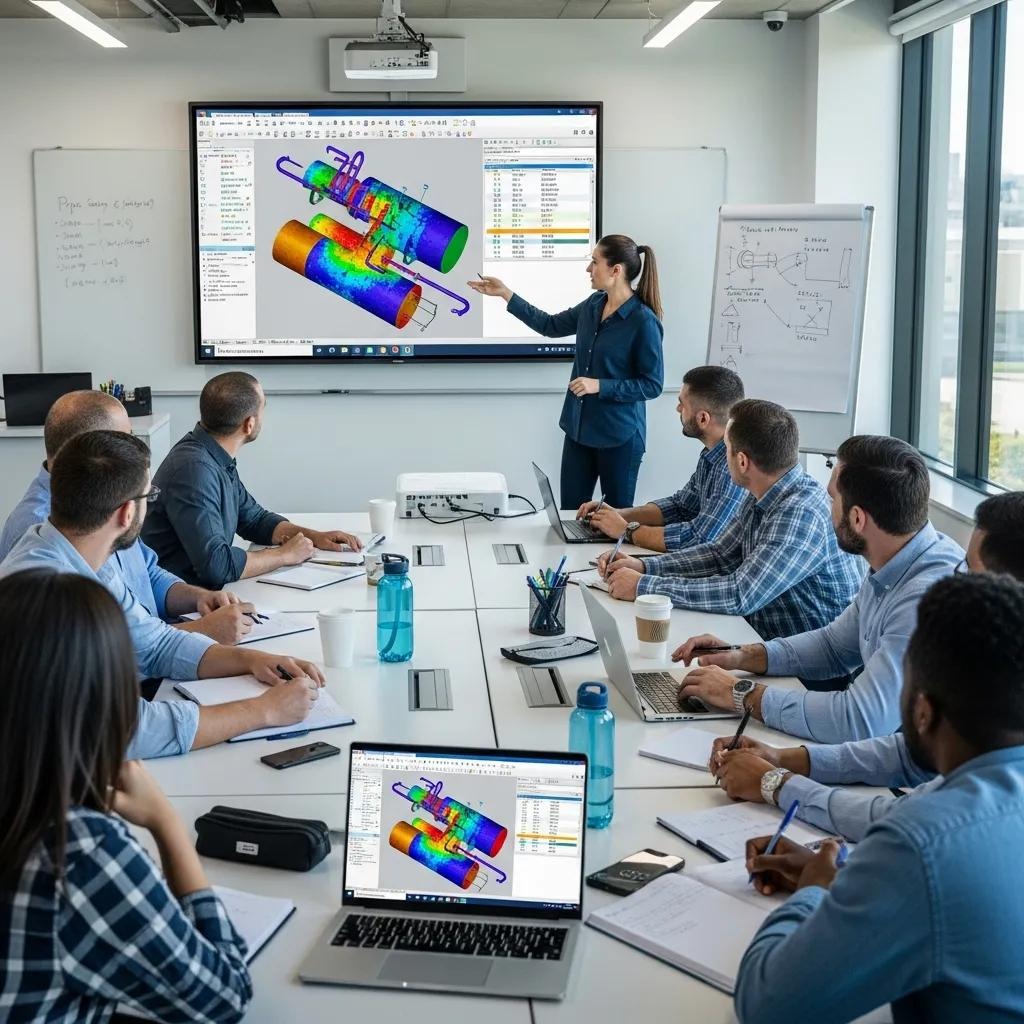
Targeted training and structured onboarding shorten time to productive use by aligning engineers’ skills with software workflows and project standards. Effective programs blend vendor courses, hands‑on workshops, mentoring and curated documentation that capture reusable modeling patterns. Ongoing technical support — timely responses, subject‑matter troubleshooting and code‑update briefings — preserves model accuracy and reduces downtime during critical phases. Invest in a mix of training formats and SLAs to sustain value across projects and teams.
Common training modalities and their benefits:
- Vendor Training Courses: Formal instruction on product features and standard workflows.
- Onsite Workshops: Apply software directly to live project models and constraints.
- Mentoring & Coaching: Ongoing expert help to reinforce learning and solve complex problems.
- Documentation & Templates: Pre‑built templates and checklists that encode company standards for consistency.
These elements reduce modeling errors and speed adoption. Below is XCEED’s training approach.
XCEED Engineering’s Training & Professional Development
XCEED Engineering and Consulting, P.C. delivers practical training and professional development focused on FEA and pipe stress workflows for regulated industries. Their programs emphasize hands‑on, project‑specific workshops and mentoring that convert vendor features into reliable, repeatable practices. By combining deep FEA expertise with collaborative, field‑tested methods, XCEED helps teams adopt tools faster and cut modeling errors during the post‑procurement phase. Contact XCEED to scope tailored training or pilot projects aligned with your standards and compliance needs.
How Ongoing Technical Support Improves Outcomes
Good support reduces time to resolve modeling questions and solver anomalies, which is critical on tight schedules. Ask vendors for clear SLAs, expert escalation paths and a cadence of code‑update briefings. Useful support KPIs include average first‑response time, expert escalation availability and frequency of code updates. Include support performance metrics in evaluations to protect project schedules and keep models audit‑ready as codes evolve.
Real‑World Case Studies: Successful Implementations in Oil & Gas
Case studies show how the right software, disciplined modeling and targeted training lower rework, ensure compliance and shorten delivery timelines. Typical rollouts start with a technical pilot: model representative systems, validate code checks and demonstrate CAD/BIM integration. Successful implementations use integrated FEA where local stresses matter, validated material databases for temperature checks and standardized reporting templates for auditors. The common lessons: plan for compliance early, model realistically and invest in training and support to secure predictable outcomes.
Below are anonymized examples that emphasize measurable outcomes and practical methods used.
How XCEED Engineering Reduced Cost and Met Regulatory Needs
On an anonymized refinery engagement, XCEED helped operators choose a stress analysis workflow that combined a code‑compliant package with integrated FEA for nozzle verification. The work began with a pilot validating ASME B31.3 clause mapping and audit reporting, then scaled into project templates and focused training. Company materials indicate efficiency gains that reduced project cost and schedule by up to approximately 25% in certain engagements by limiting rework and speeding regulatory approvals. The success came from tight compliance traceability, validated material data and hands‑on training.
Lessons from Regulated Oil & Gas Projects
Repeatable lessons include: involve compliance and inspection teams early to define audit expectations; validate models with field data when possible to reduce conservative assumptions; and train teams before major milestones to shorten productivity ramps. Use integrated FEA selectively for local‑stress critical components and preserve metadata when transferring CAD/BIM models to avoid manual fixes. Finally, weigh vendor support performance in procurement so you have timely expertise under schedule pressure. Following these practices reduces regulatory risk, shortens schedules and increases confidence in software‑driven decisions.
This concludes the guide; strong vendor partnerships and disciplined workflows keep results consistent across projects.
Frequently Asked Questions
What common challenges arise during pipe stress analysis in oil & gas projects?
Typical challenges are handling complex load cases, staying current with strict codes, and integrating multiple tools and data sources. Modeling dynamic loads, thermal movements and seismic effects accurately takes domain knowledge and careful validation. The iterative nature of stress work consumes time and resources, so choose tools and workflows that reduce repetition and support rapid verification. Robust training and responsive vendor support are key to lowering these risks.
How can teams ensure the accuracy of pipe stress analysis results?
Accuracy comes from disciplined inputs, up‑to‑date material properties and code‑compliant checks. Use validated material libraries, keep property tables current, and run peer reviews. Integrated FEA helps when local stress concentrations matter. Run pilot studies that mirror real operating scenarios and compare results across tools when possible — early verification prevents late surprises.
What role does training play in effective software use?
Training converts software capability into reliable practice. Structured programs — vendor courses, hands‑on workshops, mentoring and templates — shorten the learning curve and reduce errors. Ongoing refresher sessions and project‑specific coaching keep teams current as tools and codes evolve.
How can organizations measure the success of a software implementation?
Measure success with KPIs such as reduced engineering hours, fewer field reworks, faster regulatory approvals and improved audit outcomes. Track engineering hours per isometric, change‑order counts and time‑to‑certify models. Collect practitioner feedback on usability and support to identify continuous improvement areas.
What are the benefits of cloud‑based pipe stress analysis software?
Cloud solutions boost collaboration, accessibility and scalability. They let distributed teams work on the same models, often provide automatic updates and reduce IT overhead. Cloud deployments scale to project demands, but evaluate data security, integration and offline workflows before committing.
What should organizations consider when moving from traditional to advanced solutions?
Plan for data migration, integration with existing systems and the staff learning curve. Test compatibility with current workflows and allocate sufficient training and pilot time. Evaluate long‑term gains in accuracy, efficiency and compliance to justify the investment and manage change successfully.